
6 Essential Filmmaking Apps for Your Phone
The filmmaking apps worth having on your phone cover the whole process: Celtx for writing the script, Shot Lister for scheduling and shot lists, Shot Designer for blocking and lighting diagrams, Cine Meter II for exposure and colour, FiLMiC Pro for manual camera control and Artemis for previewing lenses. The list was refreshed in 2026 and one discontinued app, Adobe Premiere Rush, was removed.
Smartphones keep developing and giving us features that improve efficiency and creativity in our work. Not long ago the film industry was a huge, intimidating and expensive machine that was hard to get into, especially on a micro budget. Now there are apps that condense the features of expensive studio software and equipment into something you can use from home, on set or on the bus.
Here is our pick of the most effective and affordable apps you can download right now. The list was first published in 2019 and refreshed in September 2026: every app below is still available and still recommended, two that have been discontinued or abandoned have been replaced, and there is a note on AI tools at the end. Prices change often, so check the app stores for the current cost.
1. Celtx
Use: scriptwriting and pre-production
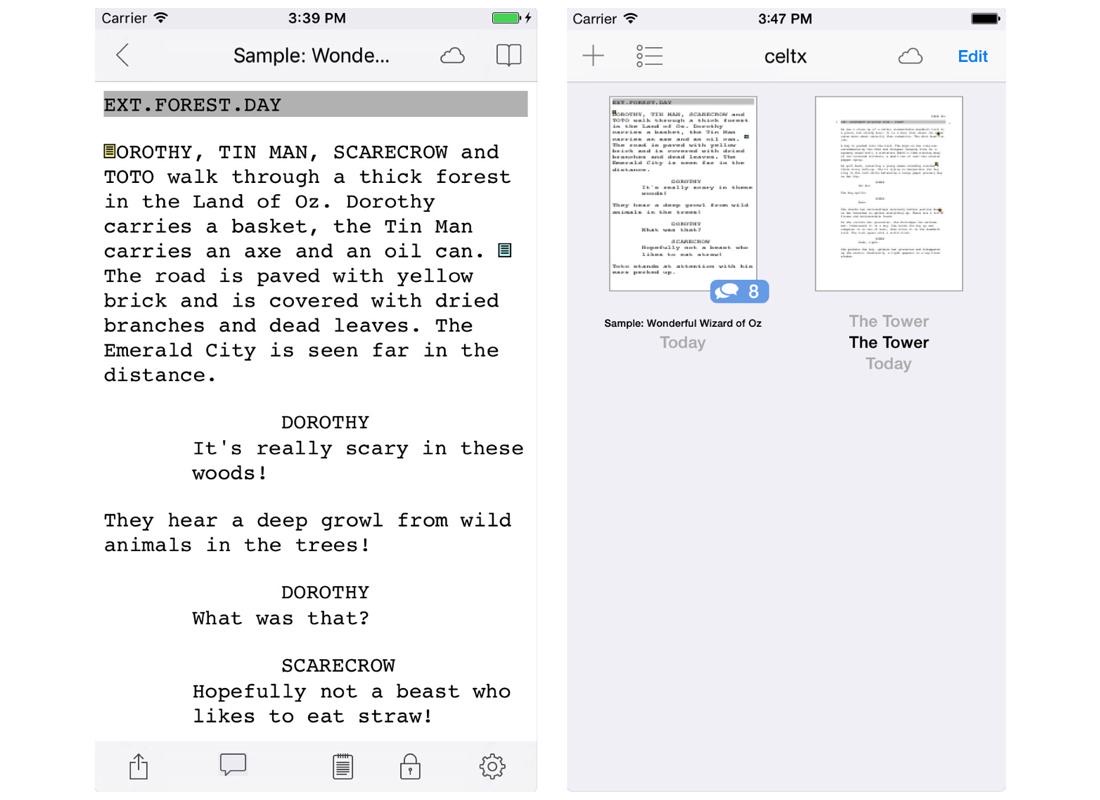
Celtx, one of the industry's leading screenwriting tools, can be used on your phone as well as your computer, so you can proofread your draft on the daily commute. Whether you are a beginner or a pro, and whether you are writing a screenplay, stage play, audio play or comic, it provides templates for all of them, and the basic plan is free. The free plan is limited, with a paid subscription if you need more. Because it is cloud-based, your scripts are synced to your account and you can switch between computer and phone whenever you like. Once logged in you will find the option to edit an existing script or start a new one. It does not crowd you with information, which makes it one of the easiest to use. The mobile app is on Android, and on other devices you can install Celtx from the browser.
2. Shot Lister
Use: pre-production and on set
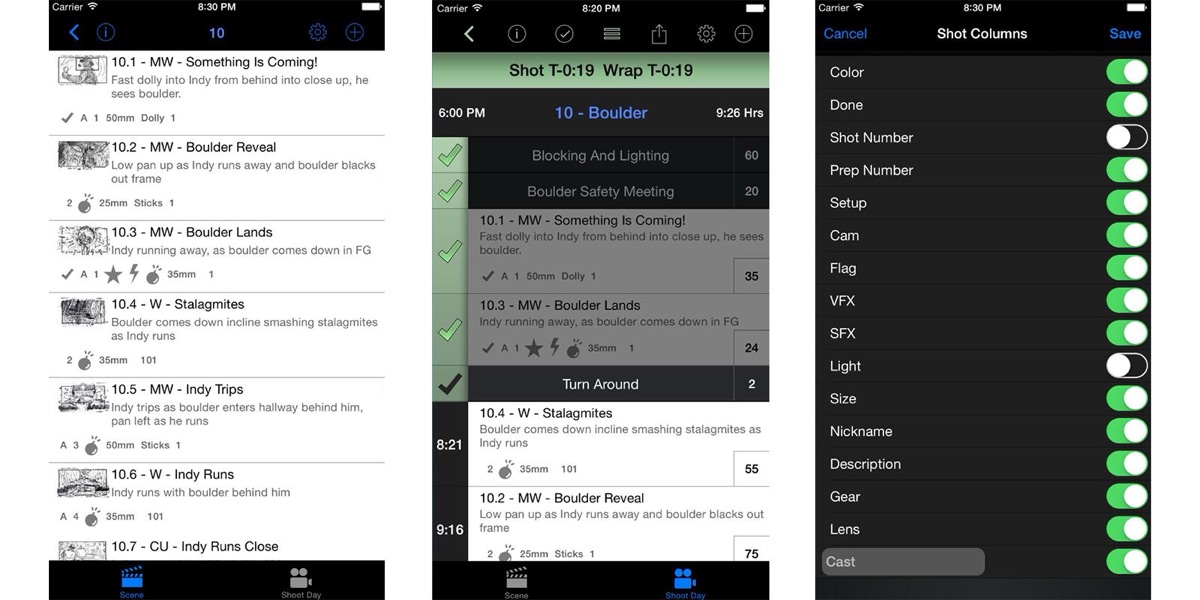
Shot Lister is a hugely useful industry-grade scheduling and shot listing app. No matter how well planned a shoot is, every filmmaker will agree that circumstances on set will often force you to rethink, replan or rearrange what you are shooting. Gone are the days of scribbling all over your schedules and call sheets: Shot Lister lets you do all of it with the flick of a finger. With features including a customisable layout, multi-camera support and easy sharing, Shot Lister is a product designed out of necessity. The standard app is a one-off purchase that covers most features and thousands of shots, and a Pro subscription adds team syncing for more advanced users.
3. Shot Designer
Use: pre-production
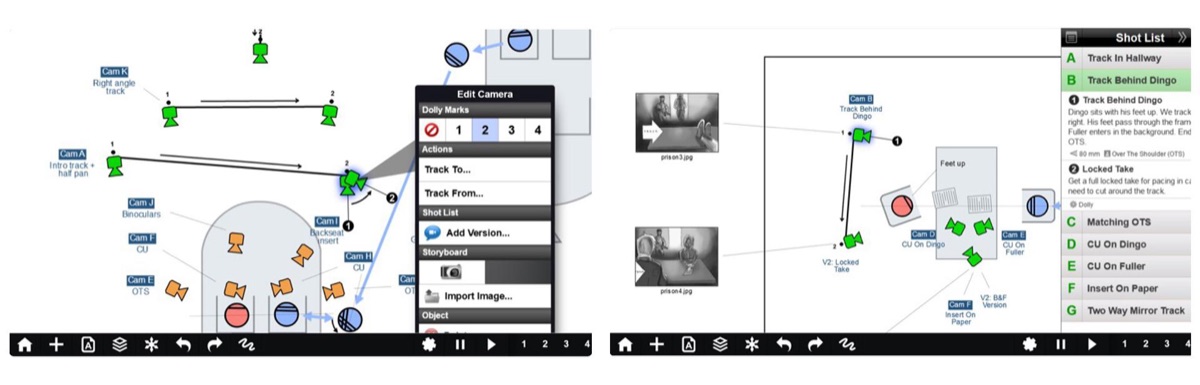
One of the most efficient pre-production apps for directors and DPs, Shot Designer lets you create simple but accurate blocking and lighting plans that save precious time on set. You draw a 2D bird's-eye diagram of the set or location, then work out how to block the scene with the actors and where the lights should go for the look you want. Once you are happy with the plan, you can convert it into a condensed shot list. There is a paid upgrade, but the free version is usually more than enough for the average filmmaker.
4. Cine Meter II
Use: pre-production and on set
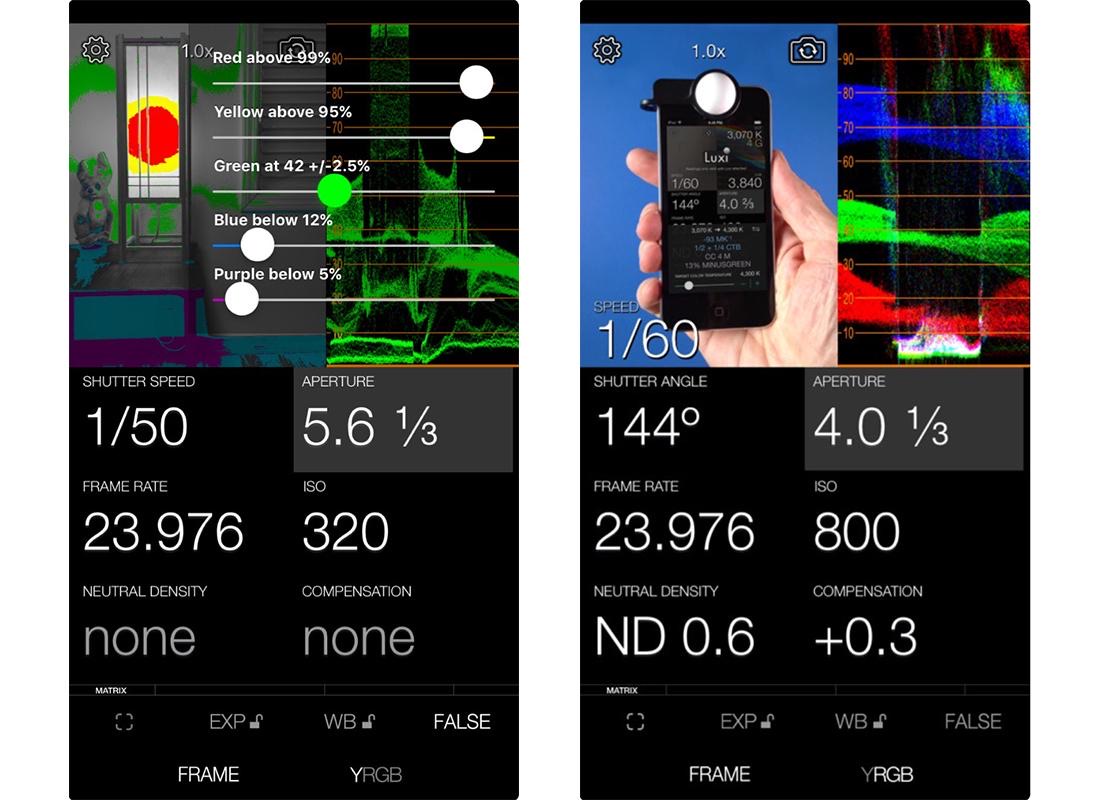
Cine Meter II takes the benefits of costly light and colour meters and puts them into an affordable app. It gives you the essential light and colour information in a simple layout, with accurate text and waveform readings, so you can expose a shot with confidence. One of its biggest benefits is that you can use it on a location recce or pre-light day to get accurate readings of the environment before you shoot, which means better lighting plans. An optional clip-on accessory lets you take incident readings too, but you do not need it for most features.
5. Blackmagic Camera
Use: on set
Blackmagic Camera is free, on iPhone and Android, and it has become the camera app most working filmmakers reach for. It unlocks the phone's camera the way FiLMiC Pro once did: manual control of frame rate, shutter angle, ISO, white balance and focus, frame guides and false colour, and recording in higher bit rates and in Apple Log on recent iPhones, so the footage grades like footage from a real camera. It comes from the company behind DaVinci Resolve, and clips can go straight into a Blackmagic Cloud project for the editor. FiLMiC Pro, which held this spot on the original list, is still on sale as a subscription, but its team was let go at the end of 2023 and development has stalled; Blackmagic Camera does the same job for nothing.
6. Artemis Director's Viewfinder
Use: pre-production and on set
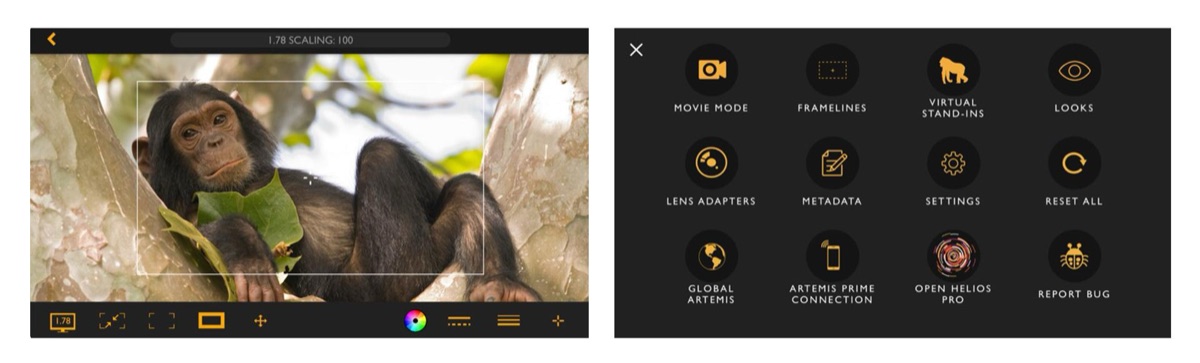
More expensive than the rest of the list, but worth it. Used by everyone from Oscar winners to student filmmakers, Artemis lets you plan shots by trying out how different lenses will look, which saves valuable time and reduces the risk of miscommunication. The best thing about it is that you can plan shots accurately months before the shoot, even if you are still learning or are not very technical. You will also likely find it the most useful resource in your pocket on set. It is easy to use: select the lens you want and let the creativity flow. Artemis also has previsualisation features such as trying out the overall look and colour grade, and its developer, Chemical Wedding, has since announced a rebuilt Artemis Pro.
What happened to Adobe Premiere Rush?
The original version of this list ended with Adobe Premiere Rush, a simplified mobile version of Premiere for editing on the go. Adobe discontinued Premiere Rush in 2025 and replaced it with a mobile Premiere app, which now includes generative AI tools for sound effects and clean-up, so if you liked Rush, that is where it went.
A word on AI tools
Since this list was written, AI has arrived in every corner of production, and some of it is genuinely useful on a phone. Adobe Premiere on mobile and CapCut both use AI for captions, cutting to the beat and removing background noise. ElevenLabs will generate a temporary voiceover for a rough cut. Image generators such as Midjourney can turn a line of description into a mood board frame in seconds, and video generators such as Runway and Google's Veo can rough out a shot for a pitch. Treat them as sketching tools rather than a way to make the film: the apps above still do the work of planning and shooting, and a good cast and a good script are still what get a short into a festival.
Filmmaking has never been more accessible, and we hope these apps help you on your way to your next project. If you are new to filmmaking, download one of the free ones and have a go, read our guide to your directorial debut, and when the film is finished there are free film festivals to send it to.
When you are ready to find your cast, Actorly is where casting directors, producers and directors in Ireland post their castings. Join Actorly as a caster and post your casting to actors across Ireland.
Frequently asked questions
What is the best free app for writing a screenplay on your phone?
Celtx has a free basic plan with templates for screenplays, stage plays, audio plays and comics. It syncs to the cloud, so you can write on your computer and proofread on your phone.
Is there an app for making a shot list?
Shot Lister is built for scheduling and shot listing, and lets you rearrange shots on set. Shot Designer also generates a shot list directly from its blocking diagram.
Can I use my phone as a light meter?
Yes. Cine Meter II turns your phone into a light and colour meter with waveform and false-colour readings, and you can use it on a location recce to plan lighting before the shoot.
Is FiLMiC Pro still available?
Yes. FiLMiC Pro is still on iOS and Android, though it has changed owners since this list was first written and now uses a subscription rather than a one-off purchase.
Is Adobe Premiere Rush discontinued?
Yes. Adobe discontinued Premiere Rush in 2025 and is replacing it with a mobile version of Premiere, so it has been removed from this list.
Casting directors post their castings on Actorly.
Build a profile in minutes, get casting alerts matched to your playing age, and apply for free.
More from the blog
 For filmmakers
Micro-Budget Filmmaking: 5 Tips for Producers
Micro-budget filmmaking tips for producers: draft the budget first, pick an achievable script, build a passionate team, borrow locations and schedule humanely.
 For filmmakers
A Beginner's Guide to Prepping Your Directorial Debut
Preparing your directorial debut: mood boards, shot lists and storyboards, a director's statement and rehearsals, so your first film shoot runs to plan.
 For filmmakers
How to Make an Award-Winning Film on a Low Budget: 10 Tips
How to make an award-winning film on a low budget: a big concept in a small space, writing what you have, location, sound, the right actors and planning.